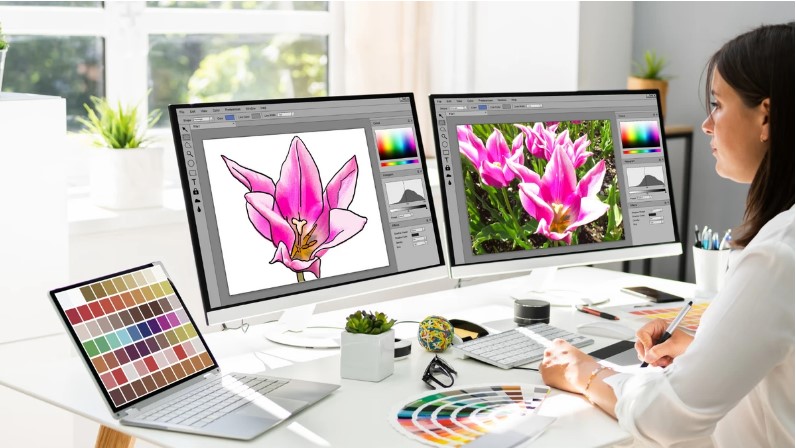
If you want flawless, sharp, and vibrant prints on your garments, Vector Conversion for DTG Printing is the secret weapon behind truly professional results. DTG (Direct-to-Garment) printing demands artwork that’s clean, scalable, and perfectly structured and that’s exactly what vector conversion delivers. Whether you’re printing custom t-shirts, hoodies, tote bags, or promotional apparel, converting your raster images into clean vector files ensures your designs print crisp, colorful, and production-ready every single time.
In this guide, we’ll break down exactly how vector conversion powers DTG printing, why it matters, how the process works, common mistakes to avoid, and how expert services can save you time, money, and frustration.
What Is Vector Conversion and Why Does It Matter for DTG Printing?
Vector conversion is the process of transforming pixel-based images (like JPG, PNG, BMP, or screenshots) into scalable vector artwork (AI, SVG, EPS, or PDF). Unlike raster images that blur when resized, vector graphics stay razor-sharp at any size.
When it comes to DTG printing, this matters because:
- DTG machines rely on clean line data
- Blurry pixels lead to muddy prints
- Vector artwork ensures smooth color transitions
- Designs remain crisp no matter how large or small
In short, vector files give your DTG printer the clean instructions it needs to lay down ink accurately and beautifully.
Raster Images vs Vector Artwork for DTG Printing
Let’s quickly compare the two so you can see why vector wins every time.
Raster Images (JPG, PNG, BMP)
- Made of pixels
- Lose quality when resized
- Can appear blurry or jagged
- Often contain background noise
- Not ideal for professional printing
Vector Files (AI, SVG, EPS, PDF)
- Made of mathematical paths
- Can be scaled endlessly without quality loss
- Ultra-clean edges
- Perfect for color separation
- Ideal for DTG, screen printing, embroidery, and more
If your design starts as a raster image, converting it to vector is one of the smartest decisions you can make before printing.
Why DTG Printing Works Better with Vector Files
DTG printers spray ink directly onto fabric in precise layers. If your artwork isn’t clean, you’ll see issues immediately in the final print.
Here’s how vector conversion improves DTG output:
- Sharper lines and details
- Cleaner color edges
- More accurate gradients
- Better ink control
- Smoother blends
- Less background noise
- Reduced print errors
Simply put, vector artwork gives DTG printers the clarity they need to print exactly what you see on your screen.
How Vector Conversion for DTG Printing Works (Step-by-Step)
Let’s walk through the professional process so you know exactly what happens to your design.
1. Artwork Evaluation
The first step is reviewing your original file. This includes:
- Checking resolution
- Identifying rough edges
- Detecting background noise
- Assessing colors and gradients
- Reviewing fine details
Low-quality images usually need cleanup before conversion begins.
2. Image Cleanup and Prep
Before vectorizing, professionals remove:
- Pixel distortion
- Dust and grain
- Unwanted background
- Jagged edges
This step ensures the final vector file is smooth and print-ready.
3. Manual Vector Tracing
Instead of relying solely on auto-trace software, expert designers manually trace the artwork using vector tools. This creates:
- Smooth curves
- Sharp corners
- Perfect symmetry
- Balanced line weight
Manual tracing is what separates amateur vector work from professional-grade DTG artwork.
4. Color Optimization
DTG printing relies heavily on accurate color separation. During this stage:
- Colors are simplified
- Overlapping fills are corrected
- Gradients are refined
- Ink saturation is balanced
This prevents muddy prints and keeps colors vibrant on fabric.
5. Final Vector File Export
Once perfected, the design is exported into DTG-friendly formats like:
- AI
- SVG
- EPS
These files are ready to load directly into your DTG printing software.
Common Problems Without Proper Vector Conversion
Skipping professional vector conversion might seem like a shortcut but it usually leads to expensive mistakes, such as:
- Blurry or fuzzy prints
- Jagged outlines
- Incorrect color blending
- Background artifacts
- Ink oversaturation
- Poor fabric penetration
- Customer dissatisfaction
All of these issues can result in wasted ink, ruined garments, and lost profits.
Who Needs Vector Conversion for DTG Printing?
Vector conversion isn’t just for large businesses. It’s useful for:
- Apparel brands
- Custom t-shirt shops
- Etsy sellers
- Promotional product companies
- School uniform suppliers
- Event merchandise vendors
- Marketing agencies
- Clothing startups
If you print designs on fabric, vector conversion is essential for professional-quality output.
Best Design Types for Vector Conversion
Almost any design can be converted to vector for DTG printing, including:
- Logos
- Typography
- Mascots
- Line art
- Badges
- Icons
- Tattoo-style art
- Skate and streetwear designs
Even hand-drawn sketches can be transformed into stunning print-ready vector art.
DTG Printing and Color Accuracy: Why Vector Wins
Color is everything in DTG printing. Since ink is applied directly to fabric, any flaws in the artwork become immediately visible.
Vector conversion ensures:
- True-to-screen color reproduction
- Clean separations for white ink layers
- Balanced opacity and transparency
- Consistent results across garments
This is especially important for brand logos where color accuracy is non-negotiable.
Auto Vector Tools vs Professional Vector Conversion
There are plenty of free online auto-vector tools but they come with serious limitations.
Auto Tools
- Fast but sloppy
- Poor edge detection
- Broken shapes
- Excess anchor points
- Messy gradients
Professional Vector Conversion
- Clean, smooth paths
- Optimized node structure
- Balanced design weight
- DTG-ready color separation
- Accurate detail reproduction
If you care about the quality of your prints, professional conversion is always worth it.
How Vector Conversion Saves You Money in DTG Printing
This might sound surprising, but vector conversion actually reduces your production costs by:
- Preventing print errors
- Reducing garment waste
- Avoiding reprints
- Improving ink efficiency
- Speeding up setup time
Over time, the savings easily outweigh the cost of conversion.
Vector Conversion for DTG Startups
For new DTG businesses, vector conversion helps you:
- Build a professional brand image
- Deliver consistent results
- Reduce trial-and-error
- Impress customers from day one
- Compete with established print shops
Starting with clean vector artwork sets your business up for long-term success.
Best Practices for Submitting Artwork for Vector Conversion
To get the best results, follow these tips:
- Submit the highest-quality image available
- Provide original logos when possible
- Avoid heavily compressed screenshots
- Share your print size requirements
- Mention garment color
- Specify if gradients should be preserved
Better input always leads to better output.
DTG Printing, Vector Conversion & Branding Consistency
One of the biggest benefits of vector artwork is consistency. Your logo will look:
- The same on every shirt
- Clean across all sizes
- Accurate across color variations
- Professional in every production batch
This is essential for businesses building brand recognition.
Future of DTG Printing and Vector Services
As DTG technology evolves, demand for high-quality vector artwork continues to grow. AI tools may speed up parts of the process, but human expertise is still essential for:
- Artistic judgment
- Color control
- Print optimization
- Brand accuracy
Expert vector conversion remains the backbone of successful DTG printing.
Final Thoughts
DTG printing delivers incredible detail, vibrant colors, and on-demand customization but it all starts with clean, scalable, and professionally converted artwork. Vector Conversion for DTG Printing ensures your designs look sharp, your colors stay true, and your garments impress every time they come off the machine. Whether you’re running a high-volume print shop or building your first custom apparel brand, expert vector conversion makes DTG printing smoother, faster, and far more professional. For dependable quality, precision, and print-ready perfection, creatives and businesses alike continue to trust the expertise of Digitizing Buddy.



Leave a Reply